I just recently completed a build myself. It was pre-Ryzen so AMD wasn't an option at the time. I went with the Intel i7-7700 (quad core) at 3.6 GHz.
I was surprised by two big things: high-performance devices are extremely affordable nowadays and processors have gotten a lot better despite minimal changes in clock speed.
I went on PC Part Picker and built my 'budget' device and my 'fantasy' device. It turned out they were just about the same. I couldn't really spend more than $1500 for anything better without jumping to server-grade parts.
Yesterday I played Halo Wars 2, listened to Spotify, kept Word, Excel, Edge, Chrome, & WEKA open, and was running an embarrassingly inefficient data mining program in Python via WSL, while running a Jenkins build server in an Ubuntu Server VM, and running TeamCity in a Windows Server VM.
Even on the Intel chip, which is presumably less good at multitasking than Ryzen, I just can't throw enough at it to experience anything resembling slowdown. 8 logical cores still seems to be plenty for most users, but I could see with even more VMs that one might need more. As an aside, it is incredibly nice to be able to run VMs without even thinking about their resource consumption - it's like having my own little cloud.
I wonder if maybe Intel's marketing for their chips could use improvement. On paper, my MacBook Pro with 16Gb RAM and 3GHz i7 shouldn't be that much worse than my desktop with 32Gb RAM (most of which is unused) and 3.6GHz i7. The difference in practice is night and day. I'm losing faith in the concept of a laptop as a developer's primary device (especially with SSH & Remote Desktop being so good these days).
Just like you, I completed my build recently. Before that, for a few years I had used laptops exclusively.
I was blown away by how even a modest desktop [1] is so much faster than even a high end laptop [2]. I believe it's because any laptop will end up throttling because of thermals, unless you get one of those very heavy gaming or workstation laptops with huge cooling systems.
Oh and I had to throw away my laptop because the motherboard failed, all I could salvage was the SSD. Not going to happen with a desktop.
[1] (I have a non-overclockable i5-6500, 16GB DDR4, SSD with SATA3 interface, a GTX 1060 with 6GB VRAM)
[2] My laptop was an i7 quad-core, 16GB DDR4, SSD SATA3, GT840 GPU. Everything except the GPU was better than or equal to my desktop.
It's a shame that 2/3rds of Apple's desktop offerings are constrained by that watt budget. iMacs and Mac Minis run on laptop-grade hardware, as I understand.
Yeah it would be nice to have a headless iMac that you can upgrade that doesn't have server grade components. Right now I'm pessimistic about even the new Mac Pros being upgradable looking at the current iMacs and Macbook Pros.
There's a separate line of processors for laptops typically, with Intel it's their U line, which have lower TDP and lower core count by default (i5-XXXXU have 2 cores 4 threads by default, a desktop i5-XXXX will have 4 cores 4 threads).
The prohibitive nature of battery powered devices has pushed Intel's processors to efficient low-powered solutions, but that's a big reason you'll see desktops simply overpowering laptops at the same price range.
Not to say you can never get strong processing in laptops though, they do offer the high-end HQ line which are high TDP mobile processors. Just that the default for Intel mobile processors is "gimped" by design to allow for efficient low-power processing.
Pretty much any laptop with a high-power processor (HQ series) will perform better when plugged in. You can force them to run at higher performance off the battery (go into Power Settings control panel, select "high performance" mode), but they will burn through a battery in like 20 minutes if you're really pushing them.
Sometimes Ultrabook-style laptops will have a higher boost, but they're often thermally limited anyway so running more power just makes them throttle harder.
Some laptops come with a powersupply that isn't good enough to run the CPU on full speed so it will even throttle down when plugged in... (HP I'm looking at you...)
If you have battery power left, it might run faster and drain the battery until it's low and then throttle down. Or just shut down like an older Samsung I saw once.
A lot of laptops, by default, are set to save power significantly more aggressively when running off battery - it's most noticeable when attempting to watch netflix or play games on a cheap laptop.
That's probably entirely due to the fresh installation, unless you're doing some very memory intensive stuff and you OCed your DDR4.
I have a 4core/8thread i7 laptop (4630QM) and I cannot get it to throttle after stress testing it for multiple minutes.
The GPU throttles if my thermal paste is getting old and the laptop sits flat on a desk and a game stresses it to 100% all the time. But the CPU I just cannot get to throttle, even with the above conditions being true, unless I remove the paste.
And this is a 13-inch, single fan laptop.
Consider repasting actually, there is no reason your CPU should be throttling.
I can't find much on `4630QM` but a friend of mine bought a laptop from HP that had 4770HQ and it definitely throttled even with the fan at take-off levels.
Hell, especially the (r)macbook pro 15 that I got from my company which had the same 4770HQ - Apple for some reason believes that customers should have their legs burnt and CPU throttled before the fan even spins up.
My bad, had to check the actual laptop order receipt, it's an "Intel Core i7-4710MQ - 2,50 - 3,50GHz 6MB".
Must have it confused with my last laptop's 4/8 i7 product code (which was an i7-3630QM).
The i7-4770HQ is listed as a 2,4 to 3,4 Ghz chip, so there's no reason it should ever throttle in a 15 inch laptop unless the laptop manufacturer messed up real hard (since the same silicon running at a higher frequency, with the same TDP, is adequately cooled by a single tiny fan on a 13 inch laptop).
It's rather unfair to say that laptops generally can't have consumer desktop-level performance on the CPU side, based on a few experiences with specific OEMs.
Now, this changes entirely when 6 and 8 cores are affordable. Desktops make sense again.
Oh yes, of course mine was high-end within the category of "business PC laptops", in the grand scheme of things gaming laptops, as you say, are even more expensive but that, if anything, confirms the point I was trying to make.
I've been living the cheap-but-decent portable + big desktop in my personal life for several years now. Between RDP and SSH, I can do practically everything from my laptop with a decent internet connection aside from gaming. Plus, many of those cheap-but-decent laptops get some great battery life, especially if you're offloading the heavy compute onto a different box.
I still drool over getting a sweet $2k+ ultraportable laptop though. I'll let my office buy those things for that work and stick to the cheaper personal life. Portable devices just can't seem to live with the chaos of life, and I'd rather break a $400-500 machine than a $2k machine.
I am doing the same [1], SSH and tmux are my best friends. I did however try the expensive-powerful-laptop first [2], it wasn't worth it and my current desktop beats it in everything but gaming.
[1] $350 DIY PC + a $250 second hand thinkpad
[2] $2200 laptop with the latest i7 and discerete GPU.
I don't have an "ultra portable" but I have a $2500 desktop replacement for work. It's got a 970m and a 6700K. Yes, that's a desktop chip, and it hits 4.2GHz nicely when needed.
I mostly just tote it to the office and home, so it's quite nice.
Look at synthetic benchmarks of your chip and the MBP. It's night and day difference. I won't use a laptop to develop on either. It's too slow. (And the ergonomics are terrible anyways so a monitor, keyboard, mouse, etc are all necessary anyways)
I couldn't agree with you more, I believe these days a developer can gain more with a Chromebook for portability, and a powerful desktop/cloud VM for the beefy tasks. You could end up paying the same (or even less) as a high end laptop, but you could gain more power and benefits this way.
> On paper, my MacBook Pro with 16Gb RAM and 3GHz i7 shouldn't be that much worse than my desktop with 32Gb RAM (most of which is unused) and 3.6GHz i7.
It is much worse. Remember that the laptop i7 is a much lower power part.
My i7 2600k is getting a bit long in the tooth, but I can get it to sweat by compiling yocto poky. Especially building Webkit/Chromium and Qt eats memory and cores like nothing.
As a side note, I saw someone on facebook sniping a dell m905 blade in some NY depot for less than a 100$ the thing came with 4 AMD cpus and loads of ram (maybe 64GB).
It's neither recent or pristine, but having a slim 4C/64GB thing at that price is worth considering.. no more rpi clusters :p
I considered blades but at least for me I concluded they were a bad fit:
- The centers are large and heavy, needs a fair amount of space, can't really be handled alone. Also means they're shipped on a pallet, which is somewhat expensive.
- Blades are less common overall compared to servers
- Blades have more peculiar I/O than normal servers, you can't just stick an IB card or GPU in there
- The backend I/O modules are fairly rare 2nd hand, so either you find a center which has the modules you want or you're SOL
I have both HP g6 blades and Dell C6100 blades at home...you can get both for about $200/node with 2xquad core and 24G of Ram. The only real issues with them are the NOISE and the electric usage. 16 nodes sounds like your living in an airport. The HP is 8 nodes with a shipping weight of 300 pounds. Cost $350 for shipping, IIRC - pop the sleds and the heaviest part is probably ~25 pounds, easy to handle without help. The HP blades also came with mellonox 10G cards.
My impression is that Moore's law is totally dead and CPUs have not changed in any meaningful way in 4 years. My old i7-4771 feels just as fast as my new i7-6950x. The 10 cores are nice when you need 10 cores though.
Moore's law doesn't concern it self with clock speed, but with the number of transistors. While the clock speed have stayed about the same, the number of cores have increased. The problem is that it's really hard to make a program that takes advantage of all those cores, so you as a regular consumer doesn't see any difference in your day to day usage.
One thing I find myself asking a lot is if it's really hard to make a program take advantage of the cores or if the prevalent tooling and paradigms of today make it hard to take advantage of the cores.
While most programs are not embarassingly parallel in nature, I suspect the latter plays a bigger role than most of us tend to admit.
I think you are exactly right. I've done a lot with concurrency, and the fact is that there is no life vest so you better know how to swim. I think an architecture made specifically for programs to take advantage of concurrency would help an enormous amount.
Right now we are two steps removed. There aren't even many good data structure implementations out there. There is moodycamel::concurrent_queue and different memory allocators like jemalloc and the new rpmalloc, but the vast majority of programmers likely don't even realize that malloc locks and kills concurrency. Maybe they grab something from boost that just surrounds a data structure with a mutex, which is lazy bullshit.
I actually think the majority of software that runs slow can be made to be sped up nearly linearly using dozens of threads, but the few niche libraries that help are overly complicated to compile and use, bloated with enormous dependencies and end up being a minefield of usage. At the moment many people's idea of multi-threaded is mostly fork-join techniques like openMP and that will never scale to using all cores throughout the whole program, since is one very narrow technique.
The particular implementation I had in mind is Erlang. Due to the green thread implementation, immutable data, and message passing, Erlang is able to offer a simple, robust concurrency platform. Of course it's still possible to write very sequential code but generally someone writing idiomatic Erlang won't have to go out of their way to get concurrency.
It is also far from ideal when it comes to performance from what I've seen. Maybe its overall design is good, but I don't believe that adding so much overhead over native programs is necessary.
From my somewhat limited reading it seems that the only inherent performance hit in Erlang's implementation is that all its processes can be interrupted externally, I think the term is cooperative multitasking?
Otherwise I think the rest of Erlang's performance is because it's optimized for reliability and distribution rather than raw performance.
I really think there's only two rays of hope for parallel programming.
One is promises (async/await). This takes the burden off the programmer for explicitly managing concurrency, and potentially allows lazy evaluation in many cases (if non-side-effecting). I've never worked in Lisps but it seems like a viable model in many ways.
The one I wanted to bring up was probabilistic programming. Imagine a tree where there's not just one place to put something, there's many, possibly distributed. As such you greatly reduce the chances of contention from multiple threads. They would also probably (almost necessarily) reduce the amount of rebalancing work.
GPUs seem like the perfect model here in multiple ways, not only do you have the massive degree of threading that surfaces any problems in such things but you also have the degree of threading to deterministically search these kind of structures. GPUs also highly discourage things like CAS or mutexing that we need to move away from.
I'm not sure how the tree you are describing helps anything. Reading can always be done concurrently, it isn't the problem - all threads can read from the same memory at the same time. The problem is writes, which means any alterations.
GPUs are useful for the kinds of parallelism that has always been known to be easy - fork join with all threads writing to new memory. There is no mystery to how to do this.
> CAS or mutexing that we need to move away from
compare and swap is the backbone of lock free programming. Mutexes to me seem to rarely be ideal, but there is no getting away from compare and swap as far as I know.
As someone with only a basic understanding of threads, what is a better idea than fork/joins for scaling? Are you talking about thread pools or something else?
Yes for thread pools instead of forking (could be process pools too). But that's only scratching the surface. It's how you communicate with those threads and allocate their work that makes the difference.
I think the quick and dirty answer is yes, although I doubt I would structure things the same way as a normal thread pool.
If you think about the heart of the problem, it is really synchronization, and that only needs to happen in certain places in programs. Anything you can break up into pieces that can be transformed independently can be leveraged for concurrency, which also implies that independent stages in a pipeline can be concurrent as well.
I have an FX 8350, and I really want to upgrade. Performance per core of the newest processors are approaching 2x of mine. Trouble is, except for Civilization, no game actually needs a faster processor. It's really hard to justify. Processors just last a really long time these days.
Cities: Skylines with large cities benefits very much of a higher core count, as the citizen/vehicle simulation parallelizes nicely. No experience how well it behaves with Ryzen though, but at least it is utilizing all cores on my trusty old Sandy Bridge i7.
It is true that moore's law no longer applies to CPU's, but it is not as if no advances are made at all, provided you pick the right CPU.
The single thread performance on the 6950X is pretty low, and in fact pretty much on par with that 4771. If you want higher single-thread performance you have to opt for fewer cores at a higher clock rate, something like the i7 7700K, which would definitely perform significantly better than the 4771. The 6950X really only makes sense if you have a workload that needs those 10 cores.
The HEDT chips have very low stock clocks but they overclock really well.
Broadwell is kind of an exception here since it clocks so poorly both in the small-chip and HEDT form. But for example, 4.7 GHz is a good OC for Small Haswell and the Haswell-E HEDT chips will usually go to at least 4.5 GHz.
(of course the major caveat here is power - a highly OC'd 8-10 core chip can easily pull 200-250 watts package TDP on a normal workload, 300+ watts as measured at the wall. For an AVX-heavy workload like Prime95, add another 100 watts package TDP.)
So overall the penalty for using HEDT chips is nowhere near as big as you are implying here. It's something on the order of 4% loss of single-thread performance to go from 4-core to 8-10 cores. It just doesn't come that way out of the box - largely because anyone who buys a 10-core gaming chip for $1700 knows exactly how to do all this.
The bigger problem is that the HEDT chips are 2 generations behind the smaller chips. Broadwell vs Broadwell-E, the numbers look fine, but Kabylake has some IPC improvements and clocks significantly higher than Broadwell does.
This is one of those things that actually can be blamed on "Intel being lazy because they have no real competition". They could certainly push the HEDT chips out a little faster instead of waiting to work out all the bugs in the smaller chips, it would just be a bit riskier for them.
The Moore's law is maybe not dead, but it indeed feels that the speed isn't changing that much.
Think about that: a 4 back your PC started in 10 seconds and 2 years back it's starting in 5 seconds, that's 5 second difference that you feel.
Currently the PC's start at 2.5 seconds and the speed difference is much less, so it feels like the power is not progressing that fast.
I have recently "upgraded" my desktop with an SSD (but have an old CPU i7 4780k or something) and it loads in a few seconds. But I don't want to upgrade my CPU just yet as it will only make everything only 1 second faster, not worth 300 USD I think.
But if you do a lot of data processing, software builds, ... You can increase the speed much more, and then it should matter.
I just replaced my nearly 6 year old Core i5 laptop with a newer Core i5 laptop. CPU performance was fine on the old one, and while the new one probably score better on benchmarks, it's not noticeably faster than some previous jumps(such as the old Core i5 laptop replacing a 3 or 4 year old Core 2 Duo laptop). Of course there were still reasons to upgrade with the biggest being far better battery life and of course non-CPU upgrades in the new laptop like a much better screen and an SSD(which I probably would have upgraded the old one with and kept it if not for the screen and battery life).
I'll toss a comment in from a layman: Isn't it also true that cores are adding more and more specific instruction sets to boost common workloads? Graphics, encryption, etc.
Then you have improved architectures, memory/cache access, inter-core communications... there are more ways to improve a chip.
I agree with your snetiment, for general workloads. I have a 4 year old Haswell and it's working like I imagine the i5s today would perform on a basket of workloads.
Are you, primarily, a developer? Did you find enough scenarios where i7-6950X feels justified, aside from rendering, encoding where this CPU really shines? What does the rest of the setup look like?
The two went hand in hand for so long, it's hard not to feel the loss. Smaller transistors were able to be clocked faster - until they couldn't. For a while they were able to use higher transistor counts to get more instructions per clock, but even that strategy is running out of steam. The big news about Ryzen is that it was finally able to catch up to Intel in that regard.
Just because people want it to be about serial processing speed doesn't mean that it is. The reason it is inaccurate to say that moore's law has ended is that there are still transistor density increases, albeit more slowly. These don't lead to the same clock speed increases or serial processing speed increases, but they do lead to more cores in both CPUs and GPUs.
Equating the single core speed of Intel's latest CPUs and moore's law is just another case of simple, easy and wrong.
> For a while they were able to use higher transistor counts to get more instructions per clock, but even that strategy is running out of steam
On a single core, not over a whole processor, as can be seen by the fact that there are 22 and even 72 core processors available now.
> The big news about Ryzen is that it was finally able to catch up to Intel in that regard.
This has nothing to do with Moore's law, it is a result of processor architecture.
The first 30 years of Moore's law showed a direct correlation between transistor density and clock speeds. Yes it's not Moore's fault that this correlation broke down, but we can still mourn its passing.
> On a single core, not over a whole processor, as can be seen by the fact that there are 22 and even 72 core processors available now.
A worthwhile development, but not a panacea. I'd suggest you become familiar with Amdahl's law: https://en.wikipedia.org/wiki/Amdahl%27s_law. There's also some give-and-take between core count and individual core performance.
> This has nothing to do with Moore's law, it is a result of processor architecture.
But Moore's law is an enabler of more sophisticated processor architecture.
Once again, there are still transistor density improvements.
> A worthwhile development, but not a panacea. I'd suggest you become familiar with Amdahl's law
I'm not sure what you are trying to say here. Are you going back to saying computers aren't getting faster and then trying to say that moore's law is therefore dead when we've already established that it was never about speed?
Also what is your point about Amdahl's law? I work with lock free concurrency all day every day and if you are trying to say that more cores doesn't mean more speed because of Amdahl's law, that is pretty shaky ground to say the least. For some reason people seem to assume that if the software they use isn't using multiple threads effectively that it must be impossible. This is FAR from the case. Most programmers don't know how to work with concurrency and most software is trapped in legacy architectures that make parallel computations become painful changes.
> But Moore's law is an enabler of more sophisticated processor architecture.
Again, this tangential and not even really true. AMD's CPU architectures suffered while their GPUs performance and manufacturing process has remained competitive.
Bought my Q6600 quad core processor 10 years ago. 10 years on, Intel still refuses to make 8 core processors mainstream to PC. Lucky enough, I don't have to listen to Intel's stories on why 8 cores are not useful for PC, I can pay AMD $300 and get Ryzen.
Just bought Intel Optane memory this morning, installed it in my AMD Ryzen DEV machine and it works perfectly without any issue. Interestingly, according to Intel, this is not suppose to happen - you are expected to use both of their latest processor/chipset to run Optane memory!
Now you tell can me who is preventing people from accessing the best techs at reasonable prices.
> Just bought Intel Optane memory this morning, installed it in my AMD Ryzen DEV machine and it works perfectly without any issue. Interestingly, according to Intel, this is not suppose to happen - you are expected to use both of their latest processor/chipset to run Optane memory!
How are you measuring Optane working? AFAIK it's supposed to improve boot times and application load times as it learns after a few times without configuration. Are you observing this improvement or does the Optane just show up as a regular storage drive?
I am using Optane Memory as a 16GBytes SSD with very good write latency. In more details, I am using it with my Raft[1] library implemented in Golang. Raft log entries are saved into RocksDB with fsync enabled, it is basically a I/O latency sensitive program and arguably one of the best use cases for Optane. The write performance boost observed here is just insane. With the WAL configured to be stored on that 16GBytes Optane device and the actual table files stored on much cheaper/slower regular SSD, 16GBytes is more than enough for my use case.
Thanks for the link, seems like interesting material.
From what I gathered in the link in order to perform recovery you need a non-volatile and accurate history of a server's execution state? Using a RAMdisk to store the state and asynchronously writing it to SSD would not be fault tolerant enough in general?
The Optane Memory hardware is a NVMe SSD. The caching is done in software, and Intel's caching software is locked to their most recent consumer-grade platform (and Windows 10 64-bit, and only caching the boot volume). Using caching is optional; it also makes for a very fast primary storage drive, if you can survive on a mere 32GB. Or you can use non-Intel caching software for Windows or Linux and then the only system requirement for Optane Memory is that you have PCIe lanes to connect it to.
You mean Intel doesn't want to tell the _full_ story? I have to agree with you on that. Official statement from Intel included below -
"A system that is Intel® Optane™ memory ready includes: a 7th Gen Intel® Core™ processor, an Intel® 200 series chipset, M.2 type 2280-S1-B-M connector on a PCH Remapped PCIe* Controller and Lanes in a x2 or x4 configuration with B-M keys that meet NVMe* Spec 1.1 and System BIOS that supports the Intel® Rapid Storage Technology (Intel® RST) 15.5 driver."
"it also makes for a very fast primary storage drive, if you can survive on a mere 32GB"
or
"you can use non-Intel caching software for Windows or Linux and then the only system requirement for Optane Memory is that you have PCIe lanes to connect it to"
They use "Intel® Optane™" to refer to the whole "solution" including their awful Windows-specific hardware-supported caching hack (Rapid Storage Whatever), because that's how they're going to sell it to consumers. Of course the drives are normal NVMe and you can use them as L2ARC+ZIL in ZFS :D
I won't call it a normal nvme. Companies don't make/sell nvme SSD with such awful sequential R/W performance. On the other hand, its random write performance at low QD is not matched by any competitor.
It is $45 unit price is another interesting factor for me - I only need 16GBytes but I need 16GBytes each on many machines. I am not really aware of any other tier-1 brand nvme SSDs that are available in such size/price. ;)
I've booted Windows 10 from it on an ASRock E3V5 Gaming/OC motherboard, and haven't found anything in its behavior that seems to be non-standard (except that my first one died, but that doesn't seem to have been related to my test of it as a boot drive). Intel hasn't mentioned it being unusual that I was able to boot from it.
What kind of system configurations have you found to cause problems? I wouldn't be surprised to see the NVMe remapping feature of Intel's chipsets get in the way, but that can be disabled on virtually all systems that have the feature.
Hey, I got the Q6600 too, still running great. Only problem is that the old motherboard has issue accepting new RAM, making it impossible to add RAM beyond 8GB. May be time to get a new system.
You do realize there is an i7 HEDT ("high-end desktop") lineup that has more cores for, oh, 10 years now, right? Intel will happily sell you an unlocked/overclockable 10-core processor.
If you have coin, Intel has wares.
Having the coin being the key factor here. I won't deny they're expensive. But "computer equipment gets cheaper over time" doesn't make quite as nice a story as THE MAN keeping you down, does it?
None. My question is what is the advantage of upgrading Intel (quad core) processors every 3-4 years? I bought i7-4770 almost 4 years ago, I couldn't name any single application that is too slow to run on i7-4770 due to its single core performance - the constrain is always the number of cores in a single box.
May I chime in here? Still runnung Q6600, bought it from a guy working at intel, as soon as it came out. Overclocked to 3.3GHz (on air cooling, without problems or higher voltage).
Replaced only this year because 8G memory is not enough anymore :(
For lots of use cases, four cores probably saturate the memory bus. But, yes, Intel does try to protect the Xeon brand and core count is probably part of that story.
Intel's 6/8/10-core i7 lineup all has quad-channel memory, so no, neither core count or fatter memory bus is a particular story that's unique to the Xeon brand.
Intel doesn't make 8-core consumers CPUs because their 4 cores are roughly as fast as 8 AMD cores. So doubling the core count would produce too much heat.
cpubenchmark's multithreaded results tend not to scale well with additional cores; comparing results between the two on other better-scaling workloads shows the 1800x blowing the pants off of the 7700k.
Well Intel didn't have to because they had peak performing chips for a long time. But now AMD will give Intel run for the money again. Intel focused more on getting better yields(margin) and power related features like much lower idle power and more C, P states, which makes sense if you're at the top. They focused on other loose ends than performance.
As someone who's been near server space, seriously fuck Intel. Blocking ECC memory from consumer CPUs is monopolistic bullshit, my next PC will be AMD even if it's a bit slower. At least AMD doesn't switch socket every 6 months and cripple my hardware on purpose
You can't run a production database without ECC. Well, you could, but you probably wouldn't have a job very long.
Memory gets less reliable with each process shrink. They keep raising the DRAM refresh rate with various tricks but we're always right on the edge of having memory with so many errors that it's unusable. The size of memory cells has decreased to the point that a stray subatomic particle could cause multiple bit errors.
Just wait for the next big solar storm. We don't know how often they strike the Earth but it seems to happen every 20 years or so. When it does we're going to have a massive flash of corrupt data from machines not using ECC. Probably worst than y2k issues
So when that happens, it will be important to have the option.
Until then, since I have no reason to run a "production database" on my workstation, why would I want ECC?
> we're always right on the edge of having memory with so many errors that it's unusable.
That's fine by me. Living here on "the edge", even with overclocked memory, my system is the most stable system I have ever owned.
I really can't see any reason to use ECC on my desktop apart from fear of hand-wavy potential issues.
Is my personal experience so unique? Are any of you actually experiencing instability that you are sure is caused by physical memory errors that are fixed by using ECC memory?
While the solution here works, the alternative is you can find a used Intel S2600CP from some random data center together with one or two E5 CPUs. You can get much more possibilities of upgrading the rig this way.
I recently built such a PC with roughly $950, it includes one used E5-2650c2, used S2600CP board, 750W power supply, 32GB DDR3 ECC memory(I'm buying CPU, motherboard, power supply and memory from one vendor so I didn't know if the memory is new), brand new GTX 1070 and a brand new 128GB SSD. The good part is the board has 2 CPU slots, 16 memory slots and 6 PCIE slots, so if I feel the need, I can easily by another E5-2650 CPU, or 12 8GB memory sticks to make the total memory 128GB(or more if I choose to upgrade current 4*8GB memory sticks as well), or add more graphics cards for machine learning purposes.
Of course this won't cover all use cases since server CPUs tend to have more cores than high frequencies(mine has 8 cores, and 16 threads after HT, but only at 2.00GHz), which might be bad for high end games, but for programming tasks as described by the article here, this might be a better choice
TBH I haven't tested it yet since the GTX 1070 card is still in shipping state, but I guess ihattendorf has provided detailed information :) If I can complete the setup before HN locks me from editing, I will edit this post
Okay so I manage to complete the build, on idle this is about 80w, but notice I have a 1070 card, which costs around 37w according to nvidia-smi, so if you don't need a graphics card, I'd say 40w - 50w is more than enough in idle.
Not the person you're responding to, but I have the S2600CP2J w/ dual E5-2670, 128gb ram, 8 2-3tb drives + an ssd and I draw ~120 watts at idle (~3% cpu usage). 100% load is around 300-350 watts. No external video card.
Great budget server, motherboard + 2xCPUs + ram were just under $500 from NATEX, intel server case + PSU was $100 from ebay.
100W idle is quite a lot in absolute terms, and more than I'd like because my boxes tend to run 24/7 (as do yours, I assume), but I suppose for the sheer amount of hardware you're running it's actually pretty reasonable.
So energy cost would be about €240/year where I live, assuming permanent idling. Not exactly cheap, but you get what you pay for I guess :-)
Thanks a lot for the info, and congrats on the sweet rig :-)
This article reads like a rewrite of the wiki over at /r/buildapc, and I'm not sure I see how much of it leads to his conclusion---any modern, $1500 desktop is going to outperform a two-generation-old laptop with a quarter as much ram. That doesn't make the Ryzen `for programmers.` I came in expected some crazy assembly insights, but instead this is just a PC build log. Nothing really supports the title of this article: it's just clickbait without any real support. And, at this point, most people reading hackernews know it's cheaper to build a PC than buy another PC / laptop---and those that still don't are doing it because a thousand dollars usually buys you a lot of warranty and convenience.
To be fair to the writer, though he failed to mention it, core count is really what matters for the kind of work load he has (in other words, many many services running simultaneously, none of which is particularly demanding; there's just a lot of them and they all idle at > 0% CPU usage). Intel chips with comparable core count is far more expensive than the Ryzen equivalent.
That being said, you're absolutely correct in that this is far closer to a PC build log than to being a justification for why Ryzen is better than its Intel competitors. I too was expecting some "crazy assembly insights". I also do think it "reads like a rewrite of the wiki over at /r/buildapc".
So maybe I'm misunderstanding something here, but running a lot of idle things at slightly >0% is doable on a single core. my quadcore machine doesn't start showing hickups until the load is up to 12, implying I can run 3 fairly heavy tasks per core before it starts being a problem, I'd imagine I could run a lot more low-cpu tasks per core than that.
So why do you need a lot of cores for multitasking like that again?
The issue is not the "idle >0%" processes, it's about compiling, indexing, searching etc. code which is often CPU-bound (because everything is in the page cache).
I agree that Ryzen is a great chip! I am looking forward to getting one because, yeah, it makes for a great developer platform: it's got a bunch of cores, it's got a fantastic virtualization model that isn't randomly crippled on half the chips, it supports ECC ram easily, and it's a killer price-point.
The article doesn't really get into any of that, though.
If that's the case then you should just go buy a sparc server off of ebay. I bought a Sun t1000 for $80 with shipping that has a 6 core sparc t1 with 24 threads.. and for a few hundred more you can get 128 threads in one 2u server! I suppose not everyone wants to write code for sparc (or keep a noisy server in your home office), but if all you're doing is web dev like the guy in this post then it doesn't really make much of a difference.
I still don't really see the pro to Ryzen in this case. It would be cheaper/better to get a couple used sandy bridge era (or newer in some cases) xeons off ebay with a dual socket motherboard in the multithreaded case, or get an i7-7700 for single threaded performance while still having a reasonable amount of cores+threads to play with.
For me it brings a lot of benefits: easier to find parts, consumer-level parts pricing, and lower TDP.
I'm running a dual Xeon as you mentioned, through buying ex-fleet parts at less than half price of new ones. Several issues I experienced:
- Lack of motherboard options. I had to purchase new motherboard at a high price since the ones that support dual Xeons are either in an incompatible form factor or simply out-of-stock. I settled with Asus Z9PE-D8 WS with an SSI-EEB form factor.
- Outdated BIOS. I had to order a new, pre-flashed, BIOS chip since the BIOS that came with the motherboard refused to boot with the CPU and memory combo.
- Hard to find suitable ECC RAM. The motherboard only supports limited RAM (speed + latency) configs, and finding those is becoming harder. Availability looks seasonal at times.
- Needs capable power supply. One thing that people often look past is the need of a proper PSU. I had to upgrade to one which support two CPU power connectors.
I'm running a similar setup to yours (IIRC I have the same mobo even), but I'm quite happy with it. I got new Xeons (1630 e5 @ 3.7 ghz), RAM compatibility was not something I found an issue (we're talking +/- 5 months ago here), power supply - I got a 1000W PS anyway to power several GPU's, I guess at that level they come with several connectors standard and I just didn't run into it as an issue. To be honest though I went for Xeon to get ECC, so if these new AMD's support that, then maybe next time...
What is SIMD support like for Ryzen? Does it do avx2 or something similar?
It's true that server components are generally loud. If you have the room, I recommend my setup - which is to have a (home build) rack in the basement, and run long DisplayPort cables (and USB extension cables) to the desk. Or build a closet around a rack in an office, which can be soundproofed. This does push it to the next level in terms of work involved, obviously (and cost as well if you don't have tools or time to DIY most of it).
Most programming related workloads I can think of hardly benefit from avx2. Also, the additional power draw while using avx on intel is considerable, despite the clock rate drop; so perf/watt may not be as much behind as one might initially think.
This downside is likely to become slightly more serious as time goes on and more software uses avx2; but it's certainly not crippling.
Proper cases can be hard to come up with (new they are rather expensive), e.g. I can't do anything with a 85 cm deep pizza box in my rack (because that pizza box is like 15 cm longer than the whole thing), so I needed a bit more special case, which has space for a standard 2S board but is short as well. Only Supermicro had one of those.
Yeah, this is another problem that I had. Plenty of full-tower cases these days support EATX, but SSI-EEB not so much (at least, the ones that can support it out-of-the-box).
In the end, I went with one of the Phanteks Enthoo [1] cases. Decent quality without breaking the bank :)
Go to /r/homelab and watch for a good 6 months. A lot of guys start off with old server hardware. Then, after 3 to 6 months, the noise and heat get to them, and they are begging for something more efficient.
... converse opinion, running a dev shop you want off the shelf "plug it in and go" options for developer machines. If we see significant advantages in general workflow (compiling, VM's, unit testing etc) with Ryzen at a compelling price point you can be sure we'll spec all new workstations with Ryzens once the OEM's get a solid "out of the box" solution.
We recently built an 8 core machine for a project for "how far could we push some multi-threaded" workload. The "out of the box" workstation's with 8 cores, at least in NZ, were staggeringly expensive. We managed to knock about 1/3rd to 1/2 off the price by a build our own solution but that's not workable for general purpose machines.
Early indicators for certain types of workflow, Ryzen is a blazingly fast platform at a very attractive price point.
I have an fx 8320. 8 cores and much cheaper then ryzen or intel.
4 cores is enough for (almost) any kind of multi-core dillydallying, so any "old" 4 core cpu is fine. (sidenote: firefox has "dillydallying" in its dictionary:)
It's probably the ryzen hype that got this post so high. I like AMD as well, but really.
IME many programmers think having to parallelise your code by hand is a tedious and error-prone part of programming that increases complexity for silly reasons and distracts you from the application domain, and a failure of programming language / compiler technology.
It doesn't matter how much of an expert you are if your algorithm fundamentally isn't parallel though. We just don't know how to parallelise some things.
Fully agreed, but often these can be solved by reviewing the overall (business) problem.
E.g. maybe it's hard / not worth it to process a file in parallel, but maybe the most frequent use case needs to process more than one file and files can be processed in parallel with much less work.
Do not overestimate how heavy most CRUD is. What really matters is not exposing CPU heavy hitters directly (caching) and not hitting disk (also caching). And obviously network performance. Modern "desktops" ate stronger than most older "server" hardware.
What you don't get is warranty, redundancy so you have to handle it on your own, preferably multiple machines, power supplies and network connections.
Or complete collocation if you can afford it.
Intel, unlike AMD, is hiking price for server market by disabling more important features like high RAM capacity support, ECC and remote management.
There's something screwy with how that benchmark is done on an 8 core processor. Comparing a quad core Ryzen 5 1500X at 3.5Ghz to a quad core i7 7700 at 3.6Ghz, the difference is 10423/10843, or a difference of 4%. The biggest difference comes down to AMD seems very conservative about their base clock speeds for Ryzen. Against each other at similar clocks, the single core performance is near identical.
The score you linked to showed the Ryzen as 26% faster than the i7. The Ryzen 1800x has a CPU mark of 15403 vs 12242 for the i7. I do remember reading that the Ryzen IPC is about 5% lower vs an i7, so I'm assuming whatever metric CPU mark is using takes into account the extra cores.
Completely agree. I was actually surprised how well the MBP Pro did in comparison. This article actually convinced me to invest in a new Apple laptop since that one really aged well.
I expected a new PC build with the latest 8 Core CPU and twice as much, better, RAM, to be at least quadruple the speed of a 4 years old MBP.
There is a ton of clickbait potential in Ryzen anything right now, and quite a few people are cashing in like crazy.
AMD has a very dedicated fanbase, but because they've been on the defensive for years they've built up a "siege mentality". Now that they're finally competitive again they're just going nuts.
Reviewers who put out Ryzen reviews that were perceived as less than ideal were getting death threats, and obviously the positive attention from people who were praising Ryzen as the second coming was just as intense.
Do we? I used to build my own PCs about 15 years ago when I had little spare cash. I got the feeling that approximately 5 years ago it became barely worthwhile to self-build even when excluding my own labour. Did I get it wrong?
Funny, I just finished building mine - same Ryzen 7 1800X, switching from MacBook Pro/iMac to Ubuntu as well, got 3200MHz RAM also, which booted into 2333MHz as well (will need to wait for motherboard update to get full speed I guess), M.2 SSD... I wonder if it's becoming a trend (to move from macOS to Linux)?
> got 3200MHz RAM also, which booted into 2333MHz as well (will need to wait for motherboard update to get full speed I guess)
The highest official DDR4 frequency is 2400MHz. Anything beyond that is technically overclocking.
Testing has shown that there is very little performance benefit above 2666MHz. [0]
The long and short is that manufacturers are happy to sell you 3200MHz RAM, but you're paying for speed you'll likely never use: your CPU memory controller needs to be stable at those overclocked speeds, and the performance gains are minimal.
Of course RAM overclocking only really matters for overclockers' benchmarks ( e.g. Super Pi: 6m37s @ 2133 MHz, 6m6s @ 4000 MHz https://youtu.be/NiZXmijRRjw )
However on Ryzen, RAM frequency directly determines the frequency of the bridge between the two 4-core complexes the CPU is made of! This matters a lot.
While it may be technically overclocking, the default ram clock of Ryzen boards is DDR4-2666. If you look at the right benchmarks you will see that faster ram can bring enormous performance benefits, even in games, which is an area where the contrary was claimed in the last few years. Some examples are https://www.youtube.com/watch?v=G5ejBlynOV8 and https://www.reddit.com/r/buildapc/comments/5agh8f/skylake_cp.... That's for Intel, but the same is true for AMD and Ryzen.
> you will see that faster ram can bring enormous performance benefits
Okay, so looking at the spreadsheet of results from the Reddit thread [0]:
- Overclocking the RAM from 2133MHz to 3000MHz resulted on average an 8% increase in FPS. This is a 40% higher frequency netting on average 8% more performance
- They only tested two speeds: 2133MHz and 3000MHz
I would imagine that the difference between 2400MHz (officially the top speed of DDR4) and 3000MHz would be even less than the 8% they found.
Let's assume, based on no evidence whatsoever, that the performance gains are linear. For 40% increase in RAM clock, you get 8% performance gain.
So from:
- 2400MHz->3000MHz: 5% increase in performance
- 2666MHz->3000MHz: 2.5% increase in performance
You also have to account for the fact that:
- Higher speed RAM costs more
- Overclocking will consume more power and generate more heat
Based on the above, where the average benefit from a 40% RAM overclock was a mere 8% performance gain, I'm just not seeing how "enormous" the performance benefits are.
8% are huge for something that was said to be of no relevance at all in that specific workload. And it is 8% for a small price difference. Ram prices are in flux currently, but right now I see 16GB DDR4-2400 for 119€ and 16GB DDR4-3000 for 139€. Some time ago the price was almost identical.
Also, please watch the video as well. The practical effect of having faster ram on frametimes is immense and sometimes a lot bigger than what you'd expect. Moving from just barely reaching 60 FPS in the Crysis train sequence to comfortable 80, with an i3, is very nice. There is also the Ryse sequence (~ at minute 7) where performance of the i3 doubles, just because of the faster ram.
The highest official DDR3 frequency is 1600Mhz. My 8320e board is happily chugging along at 2400Mhz. That's 50% faster.
In fact, my motherboard is advertised at a 2133Mhz max, and so is my memory.
"Official" frequencies are a very poor metric. You might as well run your memory as fast as you can, so long as it's still stable. If you are concerned about stability, just run a few iterations of memtest86.
The default RAM frequency is a factor of how many sticks you have and how many banks they have. It seems that you want to have as high RAM frequency as possible, for the unintuitive reason that Ryzen is built from two quad core "complexes" that talk to each other at RAM frequency.
I'll be building a Ryzen system tonight for a podcast. Same CPU, RAM, and SSD, and I'll put it in my Fractal R4 case. I bit the bullet and got the Asus X370 board, for the extra USB ports.
I also discovered the sad state of AM4 coolers. Honestly, I expected the CPU itself to be in short supply, but the Coolermaster bracket being out-of-stock is ridiculous. I went with a cheapish Thermaltake, and I'm considering eventually building a custom water loop.
Gave up waiting for a Mac Pro option April last year, built a monster Win 10 machine - run all my dev work in VMs and get to play the odd game in Ultra settings at astonishing frame rates on an Ultrawide. Can't see ever going back to Mac's ... in fact ordering parts for an 1800x machine at the moment.
I find that a bit of a hassle - Windows filesystem not matching Linux, etc. Do you generally work inside the graphical environment? That could be easier..
To your last point, it doesn't have to be a move. I'm not getting away from macOS for my laptop any time soon, but I am looking at getting a Linux desktop so I can use libraries that use CUDA. Having the second one doesn't mean I'll ditch the first.
> I wonder if it's becoming a trend (to move from macOS to Linux)?
Anecdotally among my peer group, yes, with Windows 10 becoming a viable option due to Windows Subsystem for Linux. I hear lots of grumbling about Apple having turned into a gadget company under Cook and apparently forgetting that they even sell the Mac Pro & Mac Mini. Two friends purchased DongleBook Pros, but they feel kind of embarrassed about having done so.
I installed Windows 10 over MacOS on my work machine, and my next personal machine will run Windows 10.
Of course, the last four years have had much less focus on core performance, or even on putting more cores into pro-sumer machines. Apple in particular is all about thinness, battery life, and passive cooling.
That's not a complaint. For most people, including me, those are good trade-offs.
Hm... Not sure I agree. I have a 2015 MBP and I was blown away by nearly 2x difference vs a comparable desktop with identical amount of RAM and CPU cores. My workload is compiling Golang code. The desktop is twice as fast and without the heat + fan noise drama.
The laptops, or at least the MBP, seem to be built to mostly run on idle IMO.
I use Chrome, JetBrains IDEs and emacs all day and recently made the switch to a beefy Linux desktop after 13 years of Apple laptops and I'm blown away by how much faster everything is. I guess I was living in denial about the performance differences.
>The laptops, or at least the MBP, seem to be built to mostly run on idle IMO.
This is very much my experience when switching from my previous MBP Retina to my power workhorse desktop. Even my newer XPS 15 is mostly optimized around idle I'm pretty sure.
I also built a Ryzen machine for development. It's great when it works, but I've found that Ryzen is unstable on Linux (Ubuntu 16.04). Every once in a while, I get kernel errors like
NMI watchdog: BUG: soft lockup - CPU#9 stuck for 23s!
which requires a hard reset. This behavior doesn't occur on Windows, though, so if you use Windows for development, you should be good.
Did you try a later kernel? out of the box ubuntu 16.04 is on the longterm 4.4 kernel. It looks like some ryzen features and patches have been added to 4.10, and they probably were not back-ported to the longterm kernels.
Not OP, but just built at Ryzen 1600 box. I've had _more_ instability when running 17.04 and settled on 16.04 which has been mostly fine, but hard crashes occasionally.
I custom built a machine last week for the first time in over a decade and from a fairly new processor and a just released video card. If I had more confidence in my PC building I guess I'd be more upset, but there are a lot of variables here and I'm still in a honeymoon phase.
I installed the official AMD RX580 drivers and it's been stable since.
Nothing out of the ordinary with a new platform. While Linux often takes longer to work this stuff out, Windows often has had similar issues in the past as well.
Having experienced first hand AMD driver instability on both Windows & Linux, AMD have lost my custom for the next 10 years..
Multiple re-occurring driver crashes using their main graphics card product line(RX380) on Windows 10..
So, pretty mainstream and yet having driver crashing (even when doing non-intensive tasks e.g. web browsing)
For the record, I'm not so sure Nvidia is any more stable either.
The only (constantly) stable graphics provider over the years has been Intel's on-board graphics.
I recently built a system with R7 1800X and Arch is randomly resetting when running its 4.10.* kernels. Fedora, with 4.11 rc builds (the real thing is out now btw) has been rock solid with weeks of uptime, running games & browsers & development stuff.
Good to know Fedora is worth a try, I'm a Xubuntu user and have Ryzen parts coming, won't need it til June so I'm hoping Ubuntu gets it sorted before then but if not I can live with Fedora for a while.
IIRC in my case it goes away once I install bumblebee. Apparently something to do with switching between internal Intel graphics and the dedicated Nvidia chip, and not at all related to your issue, except for the symptom.
It's comedic because after bootup I have about 90s until lockup, so I have to be lightening-fast to type the commands to install bumblebee. If I'm too slow: reset machine, try again.
FWIW, this is on a notebook, running Ubuntu 16.04.
I was unclear, this only happens after a fresh install, before I've installed Bumblebee and its dependencies. Once that is out of the way, I don't need to worry about it any more.
I also have been experiencing lock ups with my Ryzen system. I thought it was my RX580, but now I'm thinking it might be the CPU/mobo. Did you go with a B350?
You might want to try disabling SMT and see if that helps. No promises, could be many other things, but it might be worth a shot.
SMT support on Ryzen is really flakey, it's almost always a wash and often can hurt performance and I wouldn't be surprised to see it cause this kind of bug as well (especially in the early days of kernel support).
I have a Lenovo y510p with 3rd generation core i7. I wish I could get a new laptop/desktop, but my laptop performs just so damn well. The only changes I made are the addition of a good ssd, putting in more RAM and replacing the cd drive with the 1TB hard drive. For my workloads (typical web dev stuff) it performs quite well.
I have the same laptop. In the future I'd never buy one like it again - I think it's at a bad point in the power-mobility trade-off for me. But like you it's just too good to warrant replacing anytime soon. Everything is extremely fast since I put in an ssd and I get super confused by the posts we see all the time saying that as computers get faster software gets proportionally more bloated. Using this machine is way smoother than anything I grew up.
But in the future I want a desktop and a highly mobile laptop, not an awkwardly immobile laptop. These large laptops were nice for LAN gaming in college but I just don't do that anymore.
99% of programmers don't need a machine with liquid cooling. Even if they are targeting high performance hardware, development work can be run from a more modest machine.
He appears to be trying to build a fairly silent machine as well, so the liquid cooling will help.
Does he need that much power, though? I certainly wouldn't, but for what he is doing I can see it. He's running 12 containers in VirtualBox. Avoiding VirtualBox would help a lot, but depending on what he's doing, he may not be able to (and on Mac, I think you have no choice -- he may not realise that he'll get tons better performance without it). On top of that he's doing Closure (presumably with power hungry development toys) and lots of video conferencing. I often pair program remotely with video conferencing and it can eat half of your CPU(s). Mumble and Tmux is a much better way to go, but again setting up and getting used to the tooling is not trivial.
$2K and building your own machine vs doing some pretty serious work trying to lighten the development environment -- I can see an argument for it, even if it's not the way I would choose to go.
All-in-one watercooling systems are not more silent. The pump is audible and the lack of radiator surface means you'll hear the fans when they ramp up.
My motherboard has a liquid cooling setting for managing fans. I can rarely hear the pump and fans are very silent. It's an AIO system from corsair with 2 fans (I'm outside & can't remember the name now).
Is it anecdotal evidence time? I have NOCTUA CPU coolers in multiple Fractal R4/R5 cases and all 4 of these machines run at 100% CPU for weeks on end and you also can't hear anything. I considered going the water cooling route, but from what I could gather from various reviewers, is that like the parent you replied to, the pump makes noise as well as the fans when going overtime (not to mention a lot more expensive and time-consuming to install). Maybe it has something to do with the case? What case do you have? Did you do anything extra to silence it?
It's counterintuitive, but AIO liquid cooling is often louder than a comparable fan cooler.
It takes a lot of static pressure to force air through a radiator, and such radiators are definitionally mounted near some kind of air intake/outlet so there is usually very little noise dampening available. Also, AIOs usually have the cheapest parts available (pumps/fans) and are lower quality than you would get from a (much more expensive) custom setup.
Given enough money and a big enough radiator (Not to be confused with a heatsink) you can skip the fans. That said, such a radiator is about as big and expensive as a car radiator.
Something like Watercool MO-RA3. This can dissipate about 500W heat fanless. (4x that with full fans) Of course the room might get hot after hours of constant use.
Combine with fanless (or watercooled) PSUs and very quiet pumps for maximum silence.
I'm always concerned about VRM, RAM, and other circuitry surrounding the CPU in watercooled setups. A good fan will provide some airflow across all of these.
For desktop hardware with mid-range GPUs liquid cooling doesn't really make sense. Good air coolers and airflow which is not "in your face" bad will already be inaudible at 1m.
This. The stock cooler (that is included in the price of the Ryzen) is good enough for most stuff. Even if you want to "splurge" on a cooler, you can buy a monster cooler for ~40 bucks that is barely audible and can cool even an overclocked i7-7700K without any issues.
Liquid cooling is almost at the same price, doesn't make the build more expensive and Ryzen is great for overclocking - I think more than 1% of programmers - especially those who made decision to get Ryzen - will benefit from liquid cooling.
The nvme ssd drives are several times faster than the best sata ssd (sometimes 10x). Although I'm not sure you would be able to tell much difference. But loading up large virtual machines frequently might be a use case where a difference would be noted.
There are quite a few benchmarks and real world comparisons on YouTube that seem to indicate significant improvement in some workloads.
I'm not saying it isn't faster, I'm merely pointing out that it was a pretty serious investment in comparison to the other points of the build, and attempting to defend the idea that liquid cooling isn't insane if you're going all-out with other aspects, too.
I don't see this as a comparison between Ryzen and Intel. He compares a custom built PC with a 2017 3.6 GHz 8 core Ryzen to an older 2013 2.3 GHz 4 core i7. He could have replaced his Ryzen CPU with a similar priced intel processor and seen the same performance.
Interesting article, and nothing surprising. With an 8 core CPU - and NVME storage, the more interesting test would be to run docker compose whilst profiling a page or whatever. The author hints at it, but hard numbers would be even more fun. I would fully expect the laptop to grind to a halt in scenarios where the Ryzen just chugs on as if nothing special was going on.
I built my own 6850k system last June (4.2ghz +32gb ram + samsung 950 pro nvme), and find it great for programming - well, everything, really.
As much as this isn't for me (it was during the celeron 300a era), I really appreciate the detailed writeup and specific workflow example benchmarking.
Building a PC is fun but there's stuff that can go wrong.
In case you are not familiar with what can go wrong, here there is a vastly incomplete list:
- You can damage the PSU by selecting the wrong voltage, you might have a PSU doesn't supply enough wattage.
- You can buy incompatible components that won't work with each other.
- You could have static electricity, and you won't notice until you turn the computer on and you hear a little spark sound... that means something died.
- Causing a short circuit by leaving a metallic object lying around (e.g: a screw)
- Getting a thermal problem by applying the thermal paste wrong or connecting a fan spinning to the other side.
- Crushing the processor by installing the heatsink with too much muscle.
- Connecting light cables to pins that are not for lights causing unintended behavior.
In short, there's a lot you can get from building your own system but it can also go wrong... and when it does: no warranty, you are on your own.
You're getting downvoted by all the people who have built their own computers for years, and I think that's sad.
Building your first computer is incredibly scary and there are indeed a lot of ways to screw up. It's something that should be approached with an appropriate amount of fear so that you are careful.
But if you are careful, it's really not as bad as it seems. You can buy static wrist straps to eliminate the possibility of shocking any of your parts. I never wear one, and I'm pretty sure I've never killed anything that way. And if I had, I'd just RMA it like any other bad part.
The connectors these days are incredibly easy to match up and there won't be any problem with voltages or anything.
Incompatible parts can be returned, as long as you bought it somewhere reputable like Newegg or Amazon.
Don't leave screws lying around. This is just good sense. If you're the kind that can't keep track of things, then yeah, don't build machines that cost hundreds of dollars.
Crushing the processor? If you manage that, you didn't read the instructions. The only time I've seen bent pins is when someone didn't read. I've never even heard of "crushing" a CPU while installing it.
The rest of the stuff is just following instructions and doing things slowly and carefully.
> Crushing the processor? If you manage that, you didn't read the instructions. The only time I've seen bent pins is when someone didn't read. I've never even heard of "crushing" a CPU while installing it.
Last time this happened was back in the Athlon days were CPUs had no heat-spreader, so you could literally chip the edge off the chip by setting the heat sink down on it with an angle. Needless to say, most of the silicon in a CPU is actually needed for it to work :)
(For the record - it actually needed a decent bit of force)
This doesn't happen with mobile CPUs, which don't have heat-spreaders either, because their cooling units are much, much lighter compared to the coolers of the Athlon era.
IIRC there were also some problems with high-end after-market coolers and Skylake (which lowered mounting force tolerance due to a thinner interposer PCB), but it was publicized quickly and manufacturers reacted as well.
most of these can be avoided by just reading the manual.
> - You can damage the PSU by selecting the wrong voltage...
What voltage are talking about? Curent PSUs do not care about input (if it falls into roughly 70-280 volts no matter DC or AC and frequency). Output voltage is usually 3/5/12 or CPU-specific. All these voltages are routed to special connectors which cannot be inserted wrong way. (evev with a lot of force).
> ...a PSU doesn't supply enough wattage
This will cost you a single roundtrip to the store to replace with a beefier one.
> - You can buy incompatible components that won't work with each other.
Most stores have “configurators” (on their web sites) that show only compatible parts. If you are not sure, just google a reviev/assembly example and order the same set.
> - You could have static electricity, and you won't notice until you turn the computer on and you hear a little spark sound... that means something died.
Never ever had a part died due to static. Before assembling touch the metal case of your new PC, that is usually enough to discharge.
> - Getting a thermal problem by applying the thermal paste wrong or connecting a fan spinning to the other side.
Nowadays thermal interface is pre-applied for you. And the fan is already screwed to radiator.
> - Crushing the processor by installing the heatsink with too much muscle.
You cannot crush a new intel or amd cpu, even with a hammer (if you are not assembling ultrabooks with bare dies of course).
> - Connecting light cables to pins that are not for lights causing unintended behavior.
I do not know what are you talking about. Most of connectors can be inserted (physically) only the correct way and only into intended sockets. Those which can be misconnected are usually labeled/colored accordingly. Just match form/color/label, even a kindergartener can manage this.
I am pretty sure I've fried PSUs with 110V rather than 220V, in a 220V grid. Haven't tried this on newer PSUs.
> This will cost you a single roundtrip to the store to replace with a beefier one.
What if that store is an online store? what if you actually imported your parts from abroad? What if there is a no refund policy?
> Most stores have “configurators” (on their web sites) that show only compatible parts
If someone is filtering using the wrong criteria, e.g: price, can end up selecting wrong parts. It's possible if you are not familiar with this.
> Never ever had a part died due to static. Before assembling touch the metal case of your new PC, that is usually enough to discharge.
Yes. But you do this exactly because it's possible. It's easy to prevent, but first you need to be aware of it.
> Nowadays thermal interface is pre-applied for you. And the fan is already screwed to radiator.
Some fans/heatsinks include a pad of thermal paste, some others will require you to apply the paste. The CPU fan/heatsink is hard to connect wrong, but installing extractors in your case need you to be aware of where the air is flowing. It's not impossible to attach an extractor flipped to the other side.
-
Then after you are done with all the hardware, there comes the software, and getting everything installed correctly with the right drivers can also be challenging for some.
And yes, all issues are preventable, and a lot of it is "connecting stuff where it fits", and with a short intro and common sense it can be easy to assemble a machine.
My point was that there are still details you need to be aware of. And there's a non-zero risk you need to be aware of. Many people require help to install a printer, let alone assembling a machine.
Programmers don't necessarily have to know how to handle hardware physically (it's a nice to have skill, but not strictly necessary).
You can do really well just using laptops and the cloud. Many people will never have the need to build their own computer in this generation.
Then, for some users, specs are not everything since sometimes you can just deploy stuff to a high spec instance on the cloud (for a cost, yes. but you can dispose it after you are done). Sometimes mobility, battery life, durability, a nice keyboard, and something that doesn't overheat on your lap are more important. You cannot bring your desktop computer to a coffee shop.
Then, if it's the IDE speed... you can always tune your IDE. IntelliJ, the IDE used in the article: make sure you have the right JVM, tune the JVM settings, disable features you don't need, break down your project into smaller projects if it's too large, and temporarily exclude files that don't need to be indexed...
While it is more cost-efficient and powerful, the sound of whirling fans is not for everyone. I used to build computers with up to 10 different fans in them, it sounded like an airplane when you turned it on. I am sure my wife would be very irritated by it. The solution to that is to use water cooling or something like that, but chances are you are just using fans.
> Programmers don't necessarily have to know how to handle hardware physically
Sure, but they usually can learn it extremely quickly :)
> I used to build computers with up to 10 different fans in them, it sounded like an airplane when you turned it on
That's weird, because if you have more fans, each one can spin slower. Did you just leave them all at 100% without any software control?
My tower is extremely quiet at idle, slightly louder at 100% CPU, and only actually loud at 100% GPU. (The GPU is heavily overclocked which requires more cooling from the case fans. If I ever want it to be quiet while gaming I can just lower the GPU clock and voltage. But I prefer more frames per second, I use headphones anyway :D)
> You cannot bring your desktop computer to a coffee shop
That's why I also have a small Thinkpad. Compiling FreeBSD on it takes like a day, compared to less than 30 minutes on my desktop. Yeah sure the "cloud" is there but it's not for everyone. I like having actual powerful hardware.
A few years ago, my little sister decided to buy a herself a gaming PC, built to spec. The shop provided two tiers of building service, and she went with the more expensive "Pro" service. When the machine arrived, it did not boot. CPU error on board lit. Peeking through the back IO panel, I caught a glimpse of CPU pins. Yes, AMD. CPU wasn't seated properly sigh. They still had managed to force the heatsink on it, and the metal bracket was a little bent so after reseating the CPU properly, the sink would sit on rather loose. I'm surprised the pins were intact and the CPU still worked just fine.
Just out of curiosity, which shop was this? In my opinion what they did is basically fraud, any legitimate "Pro" service should run benchmarks and tests to ensure the hardware is in 100% working condition. Unfortunately, a lot of places prey on students and the budget conscious and do a slap-dash job no matter what kind of build you select (speaking from personal experience).
Storytime: I bought my newest computer a couple weeks ago from Puget Systems. Along with the PC, they shipped a 30-page custom binder that included the results of all the benchmarks and tests they ran, plus thermal images they took during the process to ensure optimal airflow. When I hit the power button for the first time, my desktop appeared within 5 seconds, with all Windows updates and the latest drivers/firmware installed already. The cabling job inside the PC was immaculate, and the PC is whisper quiet even though it's overclocked.
Moral is, if you're going to pay a premium for a pre-built custom PC, do it from a high quality vendor.
That's pretty poor. In Australia we have a few well known vendors that do pre-built systems and they fortunately are very high quality. The one I would use (PC Case Gear) don't allow modifications so they do them in batches, and the premium over the parts isn't very high.
I know right! I love building PCs. I was itching so hard to build a new one but couldn't really justify it... so I bought a new case and CPU cooler and did a transplant.
A fair point, though most of those are very low risk. But I want to point out that PSU voltage selection is a thing of the past. Really you should have no PSU problems if you go with a real brand.
Sure those things are potential mis-haps, but they're pretty easily covered by watching a few guide videos. You could apply your argument to the operating system ... sure you could pay someone to administer it for you under warranty, or you could just learn things as you go and you'll be fine 99.9% of the time.
Perhaps this is my age showing, but I came up building my own computers. Like many I've enjoyed the convenience of running just MBPs for years, but I've easily built a dozen plus machines, and never had any of the disastrous situations you described occur.
Same except it's several dozen since once friends/family see what I got for what I paid the next request is "Can you build one for me?".
I do it for beer/nice bottle of scotch and to keep my hand-in for when I build my work machines (I have Ryzen parts on order at the moment just waiting for them to turn up, for the new jobs desktop).
If you take your time, read the manuals (heresy I know) there isn't very much that can go wrong.
It's also gotten remarkably easier over the years, connectors have improved etc.
There's really only a handful of things that I dread doing during a computer build.
One is attaching the CPU power connector, since in many cases it's absolutely JAMMED against the top of the case/a fan/etc. Getting it off is even more of a nightmare, if you ever need to change the PSU. I changed a PSU last week and spent a half hour trying to open the latch with a screwdriver while tugging on the wires (and hoping I didn't rip them out). I tried needlenose pliers, couldn't get a grip on that stupid smooth plastic connector body.
The worst, though, is attaching those stupid 1-pin jumper sockets for the power switch/the LEDs/etc. HOW IN THE WORLD has nobody standardized that connector block and turned it into a single pluggable unit like the AC97/HD Audio connector?
With you on the 1-pin's so fiddly and often impossible to make out once you have the board in and your hands are in there, I've started taking a sharp picture of them and then having that on my phone so I can can count in and down.
Also yes why the hell is that that not a standard.
Since 1995 or so, I've built perhaps 15 machines (several as personal machines, several for others, a few desktop-format servers), with a long detour through Apple land in the middle.
I have fairly frequently had issues like the ones mentioned by the gp. Some factors: I'm clumsy and break things. I did not, in the 1990s, take static seriously. The instructions that come with computer parts are often more reminder than instruction: they have a lot of useless boilerplate, and then the actual instructions will admit more than one interpretation or simply imply the correct actions rather than state them. I have more than once had the experience of not being able to complete a build until the next day because some screw I needed was not included, or the screwhole wasn't threaded, or because a 2 cent plastic tool was not included, but still semi-required. Going back to the store might be something you can do, but maybe you'll have to wait for shipping, or maybe the store is far enough that it's a weekend activity to go (not everyone has a Fry's or Microcenter within ten miles...).
Over the weekend, I, too, picked up a shiny new Ryzen and mainboard. Since I have had poor experiences ordering parts from Amazon, Newegg, etc, I drove to Microcenter and picked up the parts I needed. If I got the wrong part, it would be a week before I could go back, so I'd probably order online, but that doesn't satisfy they "build a new machine this weekend" desire...
The sales rep helpfully told me I'd need an adaptor for the heatsink/fan, which was important and which I'd not run across online in research... why would there be a bunch of mainboards available for AM4, but no heatsinks to attach to them? But that seemed to be the case, at least there in the store. If I'd bought parts online, frustration would have definitely ensued.
The heatsink came with around 20 screws and other parts, and a complicated process for attaching a part that looked like a swiveling X to hold the heatsink against the CPU. The adaptor had a single bar with two latch-and-screw arrangements. It showed an image of how to attach it. It said "Easy installation!" in the instructions, and that was the only clue that you need not use all the other hardware that came with the heatsink. It literally took more than half an hour for me to understand that this was how it was.
While there are definitely similarities, and things that don't change much any more (ATX, for example), the details of things like storage connectors (large plastic with thick metal pins for IDE, then small plastic tabs for SATA, now a spring-loaded card insert on the mainboard with a screw to hold down the other end of the m.2 card...) change so frequently that if you only build a machine when you need it (4-10 years apart), you'll be dealing with several new connections and card types, and everything has to be approached from the standpoint of "if I slip or the static clip is pulled off the grounding or I am too confident that something should fit where it does not, I will end up going back to the store and buying a new whatever".
I upvoted you because those are true... But yes, except for getting incompatible parts and thermal problems, it's hard to manage to fall into any of those other errors.
Specifically about static electricity, almost always it's enough to just make sure you touch the metal body of the processor before its pins (what's inevitable if you are taking it from the original box). Despite the warnings, most parts are not very sensitive to static at all, make sure you discharge any extra charge by touching the floor and you are good to go.
What really blows my mind is that we seem to be stuck in terms of single-core performance. Passmark score of Ryzen 1800X is only 25% higher than middle-class, low power i5-6260U[1], despite over 1GHz difference in maximum frequency. Given that, it is really suprising that 8 core processors didn't become popular earlier
My only worry is they don't seem to have very many PCIe lanes. But they're cheap enough that you might be able to get a motherboard that supports multiple CPUs, and still save money compared to going 1 high-end Intel CPU. And it might perform better too, if the workload has mixed computation & IO.
Web development like the article mentions is probably the perfect fit there. Analytics is probably good too(R, Python, SQL). Careful if you need a video card in there, though.
I'm pretty sure the read write speeds of the newer ssd make a much greater difference in the performance than the CPU, a pci ssd would make an even greater difference
I am wondering if the benchmarks were made Linux vs. OSX...
I mean the author writes that "The Ryzen remains fully responsive and completely usable." and some years ago there was this magical patch that greatly improved the responsiveness of Linux systems: http://marc.info/?l=linux-kernel&m=128979084506774&w=2
My new build has the same case, PSU, and SSD. I went with Xeon and ECC however. My final price was very close as well. That case is HUGE - but I do like having room to maneuver in there. And it's quiet and has air filters. For reasons of stability, my "desktop" is a Windows 10 VM. Moved all my dev VMs on from my now retired machine, which I'll keep as a backup for a year.
The author states he runs his docker images as if they were production. But in production the load of those images is larger than in development. Isn't there more insentive to run lower spec images in development to find noticible performance issues?? I've always thought that dev/test should be smaller env to prod
Absolutely this, I want to throw as many resources at the development machines as I can fit onto a single machine.
I hate any kind of latency between "this should work" -> "does it work?".
I've even considered buying beefy server hardware at home but electricity is expensive and it's a rented place so I can't exactly start install server racks.
The 1800X is bad value though. It's the "I'm rich and afraid of overclocking for some silly reason" option. It's only slightly better binned. Most 1700s will reach 3.9 GHz easily (77% of them, according to siliconlottery.com). The R7 1700 is the real deal.
That's fine if you want to overclock. I need performance for work and I'm not going to dick around with overclocking - one work day lost to overclocking or an error caused by overclocking means that it's less value that just buying top-of-the-line from the beginning.
Guys, the x-ryzens are not overclocking stuff, sure good for it, but what they do is increase the speed as much as possible on the fly meaning if you cool them, they run faster (read liquid cooling). This is true also at stock clocking/speed. So yes ryzen 1700 is great with it's 65 tdp, but 1700x is even greater also WITHOUT overclocking, but well cooled. No picking, just wanted to make this obvious.
What is the video card in this setup? I missed it if he mentioned it. I suppose he's just using something that was built in to the motherboard? Yes I understand he's using it for editing text.
The ryzen may have no apu(igpu) no, but if the mobo has graphics (as many ryzen mobos do) there is no need for a pci-e gpu unless a heavy one is needed. Indeed not for editors and compiling.
My understanding is that the workload was more memory bound than CPU bound? Since the author only went with 32GB, wouldn't a laptop with 32 GB result in comparable gains?
No, laptops almost always use weaker processors and/or lack the cooling for sustained work at boost clocks.
In a primarily memory-bound workload, the obviously correct answer is a HEDT i7 or a Xeon anyway, since they have quad-channel RAM (doubling your RAM performance right upfront) and don't have the silliness of Ryzen's memory controller.
I have an $3000 XPS13 and it's the worst computer I ever had. Very bad build quality. Too hot so glue dissolves. Makes weird noises with load (or browser scrolling). Fan broken in no time. Performance not what I had hoped for.
Thank you, I got the smaller (not base) model but added the fingerprint reader, as it was only $20ish and it might prove useful. I'm glad you had no issues.


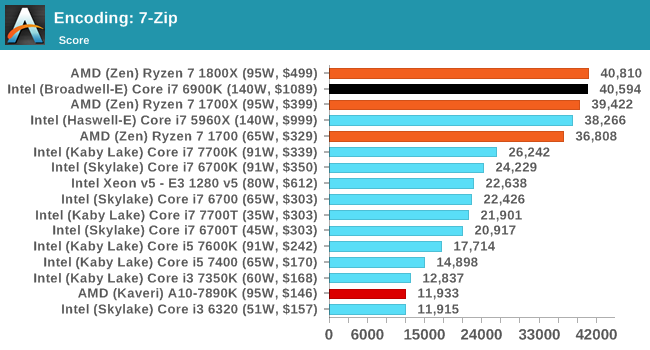
I was surprised by two big things: high-performance devices are extremely affordable nowadays and processors have gotten a lot better despite minimal changes in clock speed.
I went on PC Part Picker and built my 'budget' device and my 'fantasy' device. It turned out they were just about the same. I couldn't really spend more than $1500 for anything better without jumping to server-grade parts.
Yesterday I played Halo Wars 2, listened to Spotify, kept Word, Excel, Edge, Chrome, & WEKA open, and was running an embarrassingly inefficient data mining program in Python via WSL, while running a Jenkins build server in an Ubuntu Server VM, and running TeamCity in a Windows Server VM.
Even on the Intel chip, which is presumably less good at multitasking than Ryzen, I just can't throw enough at it to experience anything resembling slowdown. 8 logical cores still seems to be plenty for most users, but I could see with even more VMs that one might need more. As an aside, it is incredibly nice to be able to run VMs without even thinking about their resource consumption - it's like having my own little cloud.
I wonder if maybe Intel's marketing for their chips could use improvement. On paper, my MacBook Pro with 16Gb RAM and 3GHz i7 shouldn't be that much worse than my desktop with 32Gb RAM (most of which is unused) and 3.6GHz i7. The difference in practice is night and day. I'm losing faith in the concept of a laptop as a developer's primary device (especially with SSH & Remote Desktop being so good these days).